
Trips and rides
A trip is a ride of several days. The rider plans it on the phone, rides it day by day on the device, and keeps the rides as a journal on the phone. Three rules shape the design:
- A trip is one line. It has day ends on it. Trip progress is a position on that line.
- The device stays simple. It receives one ordinary route per day.
- The phone is the library. Ride edits live on the phone. The device copy of a ride never
changes after sync.
The contracts are the trip object (§7.7) and the ride footer (§7.2) in the BLE interface spec, the route format with its bike-type table in OBCR, and the device's trip progress record in the ride-archive Metadata.
One line on the phone, day routes on the device
On the phone, a trip is one line with day ends on it. It is not a folder of separate routes. When the rider moves a day end, two days change and the line does not.
The device does not know this line. At upload, the phone cuts the line at the day ends into one route per day. Each day route has the trip's bike type and a name such as "Day 2 Ulrichen". Then the phone writes a small trip object that lists the day routes in ride order. The navigator on the device sees only ordinary routes, so every route feature works on a trip day without extra code. The phone sends only the day routes that changed, and it sends the trip object last. An interrupted upload so never leaves a trip that points at nothing.
Day ends are places
The phone stores a day end as a coordinate with a name, not as a distance. After each change to the line (a join or a reverse) it projects each day end onto the new line again, near its old distance. The old distance keeps a day end on its own leg of an out-and-back line or a loop. A day end that is now far from the line is removed.
Reverse turns the direction and the order of the days. Each day end keeps its place and its name. A reversed trip is a new trip with its own key, so its progress starts empty.
Planning a trip
From files to a trip
An imported file offers three choices: a new route, add it to a trip as the next day, or start a trip. When the rider shares several files at once, the phone asks to make one trip from them. It proposes an order that chains the file ends. The rider can drag the rows into a different order. Between two rows, the sheet says "joins" or shows the gap. A trip made from files gets one day per file, with the day ends on the file boundaries.
At a gap between two files, the next day starts where its file starts, and the device's "Ride to start" covers the way there.
One long file becomes a trip in the day editor with a day-count stepper (− N +). The phone splits the line into days of equal riding time for the trip's bike type. It moves each end to a campsite, a hotel or a waypoint when one is near the ideal place. The map shows the result while the rider changes the count. After this first split, the day count changes only with Split and Join.
The day editor
The editor has one rule: each action has exactly one way to do it.
- Map and profile are one view. The profile shows the stretch of the line that is visible on
the map. To see a different stretch, the rider moves or zooms the map. The profile itself does not zoom or scroll. When a loop or an out-and-back shows both legs, the profile shows only the leg nearest the map centre.
- A day end moves only on the profile. The rider drags its pin. The pin stays inside the
visible stretch and between its neighbours, and the map stands still. To move it farther, the rider zooms the map out. The figures of the two changed days update during the drag.
- A drag on the map pans the map. Map pins do not move. This keeps the two gestures apart.
- Each day has one menu (the ··· button, or a long press): End at a stop, Rename, Split this
day (at the middle of its riding time), and Join with the next day.
- Undo takes back each step.
Stops
A day can end at a stop: a campsite or a hotel from Apple Maps, a place the rider searches for, or a waypoint from the imported files. The stops sheet lists the stops near the day end in ride order, with the current day end between them. On the map, stops show when the rider zooms in. A tap on a stop opens a callout with "End Day N here", which moves the nearest day end that can move. The day end then takes the name of the stop. The Apple Maps search needs a connection; offline, the sheet lists the waypoints only.
Stops off the line
A stop more than 150 m from the line offers two ways to reach it. The rider picks one per stop:
- Out and back adds a spur from the nearest line point to the stop. The next day rides it
back, so the line does not change. The trip object records where each day route leaves and joins the line, so the device skips the spur when it joins the rest of a day to the next day.
- Via the stop leaves the line up to 2 km before the stop and rejoins it up to 2 km after. The
old section shows dashed. The day routes pass through the stop, so the device sees an ordinary line.
The phone shows what each way adds before the rider picks. When no road is found, the day ends on the line point nearest the stop.
A gap inside a day (200 m or less, after a Join) is ridden straight. "Bridge the gap" in the day's menu routes it. The day after a transfer offers "Bridge the transfer": that day then rides the bridge, and the transfer is gone.
The router on the phone
Stops off the line and gap bridges use the device's own router, built into the app, with the device's search limit. So the phone finds the roads the device would find. The phone downloads the map cells around each request from the published catalog and caches them. Only the first request in an area needs a connection.
Transfers
A day end is a transfer when the next day starts more than 200 m from it: the rider takes a train, a bus or a ferry. The phone and the device derive this from the two day routes. The trip object has no field for it. 200 m is also the distance at which the device's START RIDE asks how to get to the start, so that prompt covers the way to the next start.
On the phone, the rider can label a transfer as Train, Bus, Ferry or Car. The label is for the journal only and never goes to the device. A transfer is fixed: a stop cannot move it, and Join does not cross it.
Dates, bike type and estimates
A trip can have a start date. Dates follow the rides: when the rider rides Day 2 on Wednesday and not on Tuesday, Day 3 shows Thursday.
The trip has one of four fixed bike types, and each day route carries it. The phone and the device use the same estimate table for each bike type. So the phone's day estimate is the device's estimate for the same day route.
Riding a trip on the device
The next day
The device keeps one progress record per trip. It writes the record when the rider finishes a ride on a trip day: where the ride stopped on the line, the last finished day, and the date of each finish. The record never crosses the wire, and a re-upload of the same trip keeps it. A ride that starts on a trip day also makes that trip the active trip.
The next day is the day after the last finished day, or the day of the last position when that is later. The route list shows the trip as one row ("Day 2 next · 3 days", then "Done · 3 days"). The start card shows the bike type, Start ride and a row for the active trip's next day, such as "Day 3 Brig", with "Show route" and its distance. That row opens the day's route detail. After an early stop, the row first builds the joined route.
Stopping early
A rider does not always reach the planned day end. When the rider finishes 20 km before the end of Day 2, Day 3 is next. The device then builds the next day itself: the rest of Day 2, then Day 3. It uses the same splice code as detours and visits (splice.rs), so the navigator receives an ordinary route.
The device does not load one long route with a window on it: every consumer of a route total would then have to know the window.
When the rider keeps riding past the day end onto Day 3's route and finishes there, the position moves onto Day 3. Day 3 is next and loads as it is. When a ride on "rest of Day 2 plus Day 3" ends before it reaches Day 3, it finishes Day 2, and Day 3 stays next. Across a transfer the device never joins two days: the next day loads as it is.
Arriving at the end
The arrival view appears only when the rider reaches the end of the loaded route during a recording. It offers three rows:
- Finish ride saves today. It is a hold, as on the Paused page.
- Ride on: Day N loads the next day's route while the recording continues. It shows only on a
trip day with a next day and no transfer between them.
- Keep riding closes the view. The route stays loaded, and the view does not come back for it.
The view waits for a riding page with nothing over it, so it never covers a gesture or a menu. It closes by itself when the rider rides on past the end.
Day done and trip done
After Finish on a trip day, the device shows a card in place of Home. DAY N DONE shows today's ledger, then TOMORROW with the next day's name, distance, climb and estimate. A second page shows tomorrow's profile. After an early stop, tomorrow is the rest of Day 2 and Day 3, as the start card loads it. After the last day, TRIP DONE shows today's ledger, the trip name, the day count and the totals of the trip's rides.
The opt-in data field Trip to go (tile caption TRIP KM) shows the rest of the loaded day plus the routes of the later days. A transfer is not ridden, so it does not count. The rider adds the field in the data-field editor.
Each ride records its trip key, its day, the trip name and the bike type in its footer. So the device and the phone group the rides of a trip without dates, and the device's ride list shows them in a trip folder.
The journal on the phone
The phone is the library
After a sync, the phone holds the rides. The rider edits, notes and shares them there. The device copy never changes: the phone keeps each synced ride as it came, and every edit is a view on top of it. "Revert to original" removes the views and gives back the synced ride.
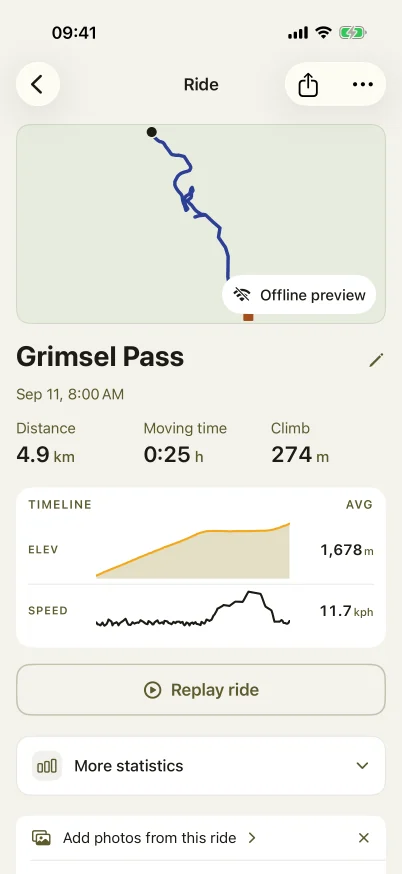
Ride detail
The ride detail shows the map, the title, the date and one stats line. The elevation profile comes from the ride's own points. The highlights name the highest point, the longest climb, the fastest descent and, on a trip, the biggest day. Quiet rows under the stats line offer the next steps. A row goes away when the rider uses or dismisses it, and it never comes back for that ride.
Photos by time
The phone offers the photos the rider took during the ride, and the rider picks which to add. A photo's place on the ride is the ride position at the time the photo was taken. The geotag does not move the photo, so a photo on an out-and-back stays on the leg of its time. A geotag far from that place only marks the photo "Location off the track". The phone stores a reference and a thumbnail, and it never writes to the photo library.
Day notes
The prompt "How was Day 2?" opens a writer with the date, the places and the distance of the day. The note saves while the rider types. The rides of one trip day share one note, so a merge never moves it.
The trip review
When a trip has rides, its page becomes the journal. The map shows the ridden part, the rest of the line dashed, each transfer with its symbol, and the photo pins. The totals count the rides, not the plan. Each ridden day shows its note and photos and opens its ride. The days still to ride stay as rows.
After a day that ended far from its planned end, the review offers to even out the remaining days up to the next transfer. The phone moves those day ends to equal riding time and near stops, as the first split does. The offer closes for good when the rider uses or dismisses it.
Library, sharing and editing
The rides list has a year menu and bike-type filters, a totals card, and a map with every ride on it. The rider can share a ride as a GPX file or as an image, or save it as a route. A saved route keeps the ride's bike type and opens as an import, so it can become the next day of a trip.
The rider can trim a ride or merge it with the next ride. When the next ride starts soon after and near the end of a ride, on the same trip day, the ride detail offers to merge them. Photos stay with their time, and the day note stays with its day.